






Übersicht
Wenn Sie jemals mit der Beschaffung oder der Entwicklung von Hardware zu tun hatten, standen Sie wahrscheinlich schon einmal vor der Frage: TFT oder IPS? Der Verkäufer sagt Ihnen, dass IPS besser ist, aber der Kostenvoranschlag zeigt, dass TFT deutlich billiger ist - was tun Sie also?
Seien wir ehrlich - viele Leute verwechseln diese beiden Begriffe immer noch. Fragen Sie zehn Beschaffungsmanager, und wahrscheinlich denken sechs von ihnen: “TFT und IPS sind zwei völlig unterschiedliche Dinge.” Das ist aber nicht der Fall. Heute wollen wir der Sache auf den Grund gehen.
1. Lassen Sie uns zunächst die Beziehung klären
TFT steht für Thin-Film Transistor. Dabei handelt es sich um eine Antriebstechnologie, bei der hinter jedem Pixel auf dem Glassubstrat ein winziger “Schalter” angebracht ist, der die Drehung der Flüssigkristallmoleküle präzise steuert. Ohne TFT würde Ihr LCD-Bildschirm nicht richtig leuchten, und das Bild wäre unschön. TFT ist also so etwas wie die “Infrastruktur” von LCD-Bildschirmen. So gut wie jedes Farb-LCD, das Sie heute auf dem Markt kaufen können, fällt in die Kategorie TFT-LCD.
IPS steht für In-Plane Switching. Es ist eine Unterkategorie der TFT-LCD-Technologie. IPS ist nicht unabhängig von TFT - es ist TFT, nur mit optimierter Flüssigkristallausrichtung und Ansteuerungslogik.
Hier ist eine Analogie: TFT ist wie die große Kategorie der “Autos”, und IPS ist eine Art von Automodell, während traditionelles TN (Twisted Nematic) ein anderes Modell ist. Wenn Sie also “IPS-Bildschirm” hören, sollte der vollständige Name eigentlich “IPS-TFT-Bildschirm”Die Leute haben sich einfach daran gewöhnt, den TFT-Teil wegzulassen.
Es ist wichtig, diese Beziehung zu verstehen, denn alle Vor- und Nachteile, die wir jetzt erörtern werden, basieren auf der Prämisse, dass IPS eine verbesserte Version von TFT ist“.”
2. Vor- und Nachteile des traditionellen TFT (TN-Typ)
Beginnen wir mit der traditionellen TFT-Technologie, die in der Branche gemeinhin als TN-TFT bekannt ist. Diese Technologie gibt es schon seit Jahrzehnten und sie ist sehr ausgereift.
Vorteile:
• Erstens: Es ist billig. Das ist der größte Trumpf von TN TFT. Da der Herstellungsprozess ausgereift und die Ausbeute hoch ist, kostet TN TFT bei gleicher Größe in der Regel 30% bis 50% weniger als IPS. Bei preisempfindlichen Produkten wie preisgünstigen Telefonen, POS-Maschinen und einfachen industriellen Steuergeräten entscheidet dieser Preisunterschied direkt über die Wettbewerbsfähigkeit auf dem Markt.
• Zweitens - schnelle Reaktionszeit. TN-Panels haben einen kürzeren Flüssigkristall-Verdrehungsweg, so dass die Reaktionszeiten sehr schnell sein können. Während IPS theoretisch Reaktionszeiten von bis zu 0,3 Millisekunden erreichen kann, hat TN in der Regel immer noch einen Vorteil in der gleichen Preisklasse. In Szenarien, in denen eine extrem niedrige Latenzzeit wichtig ist, fühlt sich TN reaktionsschneller an.
• Drittens - höhere Helligkeit und relativ kontrollierbarer Stromverbrauch. TN hat eine bessere Lichtdurchlässigkeit als IPS, was bedeutet, dass TN-Bildschirme bei gleicher Helligkeit der Hintergrundbeleuchtung heller aussehen. Und in bestimmten statischen Anzeigeszenarien verbraucht TN tatsächlich weniger Strom.
• Viertens - starke Anpassungsfähigkeit. TN-Paneele lassen sich leicht in unregelmäßige Formen zuschneiden, so dass sie sich an alle möglichen seltsamen Gehäusestrukturen anpassen lassen, was der Industriesektor besonders schätzt.
Benachteiligungen:
• Erstens - enge Betrachtungswinkel. Dies ist die am meisten kritisierte Schwäche von TN. Schauen Sie geradeaus und die Farben sind in Ordnung. Neigen Sie es leicht, und das Bild beginnt auszubleichen und die Farben zu verändern. Wenn Sie es von der Seite oder von oben/unten betrachten, kann es sogar zu einer “Graustufenumkehr” kommen - Schwarz wird weiß, Weiß wird schwarz, wie bei einem fotografischen Negativ. Der Betrachtungswinkel beträgt in der Regel nur 45° bis 55°, was unangenehm wird, wenn mehrere Personen gleichzeitig auf den Bildschirm schauen wollen.
• Zweitens - mittelmäßige Farbleistung. Die Farbraumabdeckung und die Farbgenauigkeit sind beide schlechter als bei IPS. Für das Lesen von Dokumenten oder das Scannen von QR-Codes ist das in Ordnung, aber wenn man Designarbeiten durchführt, Fotos betrachtet oder Filme anschaut, entsprechen die Farben einfach nicht der Realität.
• Drittens - begrenzter Kontrast. Die Schwarztöne sind nicht tief genug, und die Schattendetails neigen dazu, miteinander zu verschwimmen.
3. Vor- und Nachteile von IPS
IPS wurde von Hitachi (später LG Display) speziell entwickelt, um das Problem des Betrachtungswinkels von TN zu lösen. Die Kernidee besteht darin, Flüssigkristallmoleküle von “vertikal stehend” in “horizontal liegend” umzuwandeln - wenn eine Spannung angelegt wird, drehen sie sich in der horizontalen Ebene, so dass sich die Lichtdurchlässigkeit unabhängig vom Betrachtungswinkel nur sehr wenig ändert.
Vorteile:
• Erstens - unschlagbar weite Blickwinkel. Dies ist das auffälligste Merkmal von IPS. In allen vier Richtungen - oben, unten, links, rechts - kann der Betrachtungswinkel 80° bis 85° erreichen und nähert sich damit fast 180°. Egal, ob Sie von der Seite, von oben oder von unten schauen, Farben und Kontrast bleiben praktisch unverändert. Wenn sich mehrere Personen um einen Bildschirm versammeln, um einen Plan zu besprechen, oder wenn ein Auto-Display sowohl für den Fahrer als auch für den Beifahrer sichtbar sein muss, wird der Vorteil von IPS kristallklar.
• Zweitens - genaue Farben und eine große Farbskala. IPS hat eine deutlich bessere Farbwiedergabe als TN, mit minimaler Farbverschiebung und einem transparenten, lebendigen Bild. Aus diesem Grund verwenden professionelle Design-Monitore, High-End-Smartphones und medizinische Bildgebungsgeräte im Grunde alle IPS.
• Drittens - keine Invertierung der Graustufen. Ganz gleich, aus welchem Winkel Sie das Bild betrachten, der “Negativfilmeffekt”, der bei TN auftritt, tritt nicht auf. Das Bild bleibt zu jeder Zeit stabil.
• Viertens: Bessere Touch-Erfahrung. Dies ist hervorzuheben. Da IPS ein hartes Panel ist (wenn man leicht mit dem Finger drückt, verschwindet der Wasserripple-Effekt schnell), ist die Oberfläche flacher. In Verbindung mit kapazitiven Touch-Panels (CTP) sind sowohl die Glätte als auch die Präzision der Berührung besser als bei den weichen TN-Panels.
Benachteiligungen:
• Erstens - teuer. Der Herstellungsprozess ist komplizierter, die Ausbeute ist relativ geringer, so dass die Kosten natürlich steigen. Bei gleicher Größe und Auflösung ist IPS in der Regel spürbar teurer als TN.
• Zweitens: etwas höherer Stromverbrauch. IPS hat eine geringere Lichtdurchlässigkeit als TN. Um die gleiche Helligkeit zu erreichen, muss die Hintergrundbeleuchtung stärker arbeiten, was die Gesamtleistungsaufnahme erhöht. Die moderne LED-Hintergrundbeleuchtungstechnologie hat sich jedoch erheblich weiterentwickelt, sodass dieser Unterschied in der Praxis nicht so groß ist, wie man sich das vorstellt.
• Drittens: Theoretisch etwas langsamere Reaktionszeit. Während High-End-IPS-Panels die Reaktionszeiten sehr gut optimiert haben, ist TN in der gleichen Preisklasse in der Regel immer noch schneller. Aber für die meisten Nicht-Gaming-Szenarien werden Sie den Unterschied nicht einmal bemerken.
• Viertens: Ausbluten der Hintergrundbeleuchtung. Bei rein schwarzen Szenen neigen IPS-Panels zu Streulicht und Weißbruch an den Rändern, was mit ihrer Flüssigkristall-Ausrichtungsstruktur zusammenhängt. Im täglichen Gebrauch fällt das nicht auf, aber in einem dunklen Raum, in dem schwarze Inhalte betrachtet werden, ist es wirklich nicht so rein wie bei VA-Panels.
4. Was ist eigentlich besser? Das hängt von Ihrem Anwendungsfall ab
Nun gut, für welchen sollten Sie sich also entscheiden?
Meine Meinung: Es gibt kein absolutes “besser”, sondern nur “besser geeignet”. Aber wenn Sie mich zwingen, es in einem Satz zusammenzufassen - IPS bietet ein besseres Gesamterlebnis, aber TN bleibt in bestimmten Szenarien unersetzlich.
Schauen wir uns die einzelnen Anwendungsfälle an:
Wählen Sie IPS, wenn:
• Unterhaltungselektronik: Mid- bis High-End-Smartphones, Tablets, Infotainment-Systeme für Autos, Smart-Home-Panels. Die Nutzer verlangen eine gute Display-Qualität, und große Betrachtungswinkel mit akkuraten Farben sind harte Anforderungen.
• Medizinische Bildgebung: Bei der Betrachtung von Röntgenbildern und CT-Scans wirkt sich die Farbgenauigkeit direkt auf die Diagnose aus, weshalb IPS zwingend erforderlich ist.
• Industriedesign und professionelles Zeichnen: Für Designer ist die Farbgenauigkeit das A und O. IPS ist der Standard.
• Szenarien für die Zusammenarbeit mehrerer Personen: Tablets für Konferenzräume, All-in-One-Bildschirme für den Bildungsbereich, Bildschirme für Ausstellungen - wenn mehrere Personen aus verschiedenen Blickwinkeln sehen müssen, ist der weite Betrachtungswinkel von IPS unerlässlich.
• Premium Automotive: Die Bildschirme in Autos werden immer größer. Fahrer, Beifahrer und Hinterbänkler müssen alle gut sehen können. IPS ist so ziemlich die einzige Wahl.
Wählen Sie TN (Traditional TFT), wenn:
• Ultra Low-Cost-Produkte: Günstige Mobiltelefone, billige Tablets, Wegwerf-Elektronik - wenn die Kosten bis zum Äußersten getrieben werden, ist TN ein Lebensretter.
• POS-Maschinen und Registrierkassen: Verwendung mit festem Winkel, der Bediener sitzt direkt davor. Ein schmaler Betrachtungswinkel ist kein Problem - wichtig ist, dass es billig und langlebig ist.
• Industrielle Schalttafeln und Instrumentierung: Bei vielen Industriegeräten sind die Bildschirme in einem bestimmten Winkel angebracht und zeigen hauptsächlich Text und einfache Symbole an. TN ist mehr als ausreichend, und es ist knallhart.
• Außengeräte mit hoher Helligkeit: TN gepaart mit heller Hintergrundbeleuchtung bietet eine gute Ablesbarkeit bei starkem Sonnenlicht und Vorteile beim Stromverbrauch.
• Nischenszenarien mit extremer Empfindlichkeit der Reaktionsgeschwindigkeit: Zum Beispiel bestimmte spezielle Spielgeräte oder schnell auffrischende industrielle Inspektionssysteme.
Sie sehen also, IPS ist so etwas wie der “Allrounder”, während TN der “Spezialist” ist. Wenn Ihr Budget es zulässt und Sie Wert auf Erfahrung legen, entscheiden Sie sich für IPS - Sie werden es nicht bereuen. Wenn Sie ein begrenztes Budget haben, das Szenario feststeht und die Funktionalität einfach ist, bleibt TN eine sehr pragmatische Wahl.
5. TFT vs. IPS Vergleichstabelle
| Vergleich Dimension | TFT (traditioneller TN-Typ) | IPS (Wide-Viewing-Angle TFT) |
|---|---|---|
| Technologie Essenz | Dünnschichttransistor-Treibertechnologie, die grundlegende Architektur von LCDs | Ein verbesserter Zweig der TFT, In-Plane-Switching-Technologie |
| Flüssigkristall-Ausrichtung | Flüssigkristallmoleküle stehen senkrecht zum Substrat und kippen in Richtung des elektrischen Feldes, wenn sie mit Strom versorgt werden | Flüssigkristallmoleküle liegen horizontal parallel zum Substrat und drehen sich in der Ebene, wenn sie mit Strom versorgt werden |
| Betrachtungswinkel | Schmal, typischerweise 45°~55°, deutliche Verzerrung bei Betrachtung von der Seite | Extrem weit, bis zu 80°~85°, nahezu 180° Vollsichtabdeckung |
| Vorderseitige Farbleistung | Mittlere, moderate Farbraumabdeckung und Farbwiedergabefähigkeit | Ausgezeichnete, breite Farbskala, genaue Farbwiedergabe, transparentes und lebendiges Bild |
| Seitliche / schräge Betrachtung | Starke Farbverschiebung und Aufhellung, erhebliche Bildverzerrung | Praktisch keine Veränderung, Farben und Kontrast bleiben gleich |
| Grauskala-Invertierung | Bei großen Betrachtungswinkeln tritt eine Schwarz-Weiß-Umkehrung auf. | Keine, keine Invertierung bei jedem Betrachtungswinkel |
| Reaktionszeit | Schneller, kurzer Flüssigkristall-Verdrehungspfad, geringe Latenzzeit | Gute, hochwertige Produkte erreichen Millisekunden-Niveau, ausreichend für tägliche Szenarien |
| Kontrastverhältnis | Mäßig, Schattendetails neigen zum Verwischen | Hohe, reichhaltige Schattenabstufungen |
| Reinheit der Schwarzstufe | Durchschnittlich, Schwarzen fehlt es an Tiefe | Gut, aber leichtes Ausbluten der Hintergrundbeleuchtung am Rand kann auftreten |
| Lichtdurchlässigkeit | Hohe, gute Lichtdurchlässigkeit | Niedriger, erfordert stärkere Gegenlichtkompensation |
| Stromverbrauch | Relativ stromsparend, geringerer Bedarf an Hintergrundbeleuchtung | Etwas höher, Hintergrundbeleuchtung verbraucht mehr Strom (der Abstand hat sich verringert) |
| Erfahrung zum Anfassen | Weiche Platte, offensichtliche Wasserrippel unter Druck, durchschnittliche Berührungspräzision | Harte Platte, flache Oberfläche, glatte und präzise kapazitive Berührung |
| Härte der Platte | Weicher, anfälliger für äußere Kräfte | Härter, starke Anti-Press-Fähigkeit |
| Kosten/Preis | Günstig, 30%~50% niedrigere Kosten | Teurer, komplexer Herstellungsprozess |
| Herstellungsprozess | Ausgereift und einfach, hohe Ertragsrate | Komplexe und präzise, hohe Prozessanforderungen |
| Anwendbare Szenarien | Kostenempfindliche Produkte mit festem Winkel und nur einem Bediener | Betrachtung durch mehrere Personen, hohe Farbanforderungen, Produkte mit hohem Erlebniswert |
| Typische Branchen | Budget-Telefone, POS-Maschinen, Industrieinstrumente, medizinische Grundgeräte, lichtstarke Außengeräte | Mid- bis High-End-Telefone, Kfz-Zentralsteuerungen, medizinische Bildgebung, Design-Monitore, Smart Home, Konferenztafeln für den Bildungsbereich |
6. Auswahl eines Lieferanten - der Prozess zählt mehr als der Preis
Genug von der Technik. Reden wir über die Praxis - wie wählt man einen Anbieter aus?
Viele Leute beginnen mit der Frage “Wie viel?”. Das ist nicht falsch, aber wenn der Preis die einzige Frage ist, werden Sie wahrscheinlich auf Schwierigkeiten stoßen. Die Touchscreen-Branche ist sehr heterogen. Gleiche Spezifikationen, verschiedene Hersteller - die tatsächliche Erfahrung kann Welten voneinander entfernt sein.
Hier ist ein Verfahren, das ich zu Ihrer Information zusammengefasst habe:
Schritt 1: Definieren Sie Ihre Anforderungen. Starren Sie nicht nur auf die Spezifikationen.
Legen Sie zunächst Ihr Anwendungsszenario, die Betriebsumgebung, den Budgetrahmen und das Produktionsvolumen fest. Benötigen Sie kapazitiven oder resistiven Touchscreen? Außen oder innen? Wasserdicht, blendfrei, interferenzfrei? Sobald diese Anforderungen klar sind, steht der technologische Weg im Grunde fest. Erst dann entscheiden Sie sich für ein bestimmtes Modell.
Schritt 2: Schauen Sie sich die “Branchentiefe” des Anbieters an.”
Touchscreens sind keine standardisierten Produkte - der Grad der Individualisierung ist hoch. Wenn ein Anbieter über ausgereifte Fallstudien in Ihrer Zielbranche (Medizin, Automobil, (z. B. industrielle Steuerungen, Luftfahrt, Haushaltsgeräte), F&E-Projekte, technische Akkumulation, Patentportfolio und bekannte Partner aus der Industrie, werden sie Ihre Probleme viel besser verstehen und Ihnen helfen, Fallstricke in der Entwicklungsphase zu vermeiden. Auf der anderen Seite, wenn ein Unternehmen alles macht, aber nur die Oberfläche in jeder Branche abtastet, könnten Sie am Ende deren “Versuch-und-Irrtum-Kosten” sein.”
Schritt 3: Beispielhafte Tests. Schauen Sie sich nicht nur Demos an.
Sie müssen sich unbedingt physische Muster besorgen und sie in Ihrer realen Betriebsumgebung testen. Ist die Helligkeit ausreichend? Ist die Berührungsempfindlichkeit gut? Kann es mit hohen und niedrigen Temperaturen umgehen? Wie gut ist der EMI-Schutz? Seriöse Anbieter verfügen über Labors und vollständige, dem Industriestandard entsprechende Qualitätstestverfahren und Prüfstandards. Viele schöne Zahlen auf den technischen Datenblättern werden unter realen Arbeitsbedingungen entkräftet. Ich empfehle, Muster von mindestens drei Anbietern zu testen, um einen Vergleich anzustellen.
Schritt 4: Bewertung der Lieferkette und der Lieferfähigkeit.
Die Vorstufe der Touchscreens umfasst Glasplatten, IC-Treiberchips, FPC-Kabel und mehr. Die Stabilität der Lieferkette hat direkten Einfluss auf Ihre Lieferfrist. Verfügt der Lieferant über Branchenzertifizierungen und Qualitätsmanagement-Zertifizierungen? Verfügt er über eine eigene Modulproduktionslinie, ein Labor und ein F&E-Team? Oder handelt es sich um einen reinen Handels- und Montagebetrieb? Lieferanten mit eigenen Produktionslinien bieten in der Regel eine höhere Lieferzuverlässigkeit, gleichbleibende Qualität und einen besseren Kundendienst.
Schritt 5: Prüfen Sie den Kundendienst und die technische Unterstützung.
Während der F&E-Phase, Touchscreens erfordern häufig eine Treiberabstimmung und strukturelle Änderungen. Kann der Anbieter FAE-Support (Field Application Engineer) anbieten? Wie schnell reagieren sie, wenn Probleme auftreten? Prüfen Sie auch die Bewertungen und Erfolgsgeschichten der Partner. Seriöse Anbieter haben in der Regel offizielle Websites mit speziellen Rubriken, in denen Fallstudien vorgestellt werden. Diese Soft Skills können Ihr Projekt während der Massenproduktion buchstäblich retten.
7. Ein Wort über Jictech
Wo wir gerade dabei sind, ich muss erwähnen Jictech.
Auf dem Gebiet der Touchscreens ist Jictech eines der Unternehmen, die nach dem Motto arbeiten und keinen Lärm machen“ handeln. Sie konzentrieren sich auf F&E, Produktion und Anpassung von TFT-LCD und IPS-Displaymodule in Größen von 0,96 Zoll bis 32 Zoll. Kapazitive Bildschirme, resistive Bildschirme, Bildschirme mit hoher Helligkeit, Bildschirme mit hohem Temperaturbereich, unregelmäßig geformte Bildschirme - sie können alles.
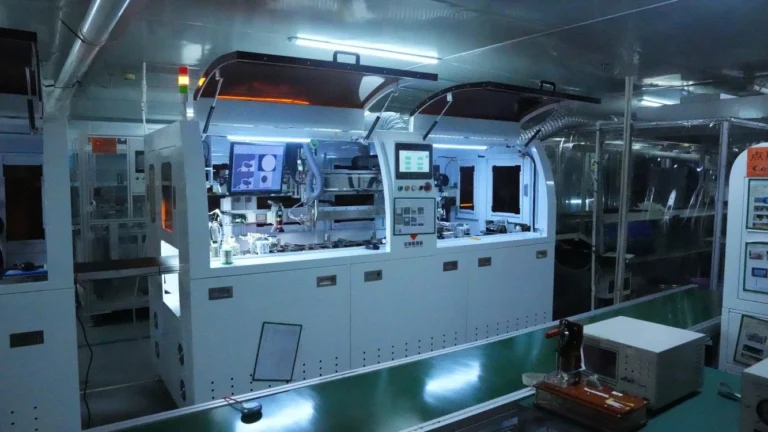
Die Stärke von Jictech liegt in der Fähigkeit zur vollständigen Prozessanpassung - von der Auswahl der Glasplatten, der Anpassung der Touch-ICs, dem FPC-Design, der Optimierung der Hintergrundbeleuchtung bis hin zur strukturellen Gesamtkoordination sind sie in jeder Phase intensiv beteiligt. Viele Kunden kommen mit einem vagen Konzept zu Jictech, das von den Ingenieuren in spezifische technische Indikatoren aufgeschlüsselt und in eine serienreife Lösung umgesetzt wird. Jictech hat sein eigenes Werk, Das Unternehmen verfügt über eine Produktionslinie, ein Labor, einen Qualitätsprüfungsprozess und ein F&E-Team in Dongguan, China. Das Unternehmen ist in der Lage, F&E, Prototyping, Qualitätsprüfungen und Massenproduktion durchzuführen. Und sie arbeiten mit erstklassigen Marken der Branche zusammen.
Sie haben auch zahlreiche Anwendungsfälle in den Bereichen industrielle Steuerung, medizinische Geräte, Automobilelektronik, Smart Home, Unterhaltungselektronik, Haushaltsgeräte und Mensch-Maschine-Interaktion. Sie verfügen über ein solides Verständnis der Industriestandards und Zuverlässigkeitsanforderungen. Wenn Sie an einem Produkt mit einem Touchscreen - ob TFT oder IPS - arbeiten, wird Ihnen ein Gespräch mit Jictech viele Umwege ersparen.
8. FAQ - 5 häufige Fragen zu TFT und IPS
Q1: Sind IPS und TFT zwei völlig unterschiedliche Bildschirmtypen?
Nein. IPS ist im Wesentlichen eine Art TFT-LCD. Sie können sich das so vorstellen: “IPS ist eine verbesserte Version von TFT”. Alle IPS-Bildschirme sind TFT-Bildschirme, aber nicht alle TFT-Bildschirme sind IPS-Bildschirme. Herkömmliche TFT-Bildschirme des Typs TN haben nicht die IPS-Eigenschaften eines großen Betrachtungswinkels.
F2: Warum verwenden einige günstige Handys immer noch TFT-Bildschirme (TN)?
Ein Wort: Kosten. TN-Bildschirme haben ausgereiftere Herstellungsverfahren, eine höhere Ausbeute und niedrigere Preise. Bei Handys, die im Budget-Segment angesiedelt sind, schlagen sich die Einsparungen bei den Bildschirmkosten direkt in wettbewerbsfähigen Einzelhandelspreisen nieder. Und preisgünstige Telefone sind einfach zu bedienen - Anrufe, Nachrichten, kurze Videos - TN ist vollkommen ausreichend.
F3: Verbrauchen IPS-Bildschirme immer mehr Strom als TFT-Bildschirme (TN)?
Theoretisch hat IPS eine etwas geringere Lichtdurchlässigkeit und erfordert eine stärkere Hintergrundbeleuchtung, um die gleiche Helligkeit zu erreichen, so dass der Stromverbrauch etwas höher ist. In der Praxis hat sich dieser Unterschied jedoch durch die LED-Hintergrundbeleuchtung und die Optimierung der Energieverwaltung deutlich verringert. Der durchschnittliche Benutzer bemerkt den Unterschied kaum. Anstatt sich über diesen geringen Stromverbrauchsunterschied aufzuregen, sollten Sie sich auf das tatsächliche Fernseherlebnis konzentrieren.
F4: Sollte ich mich bei industriellen Geräten für TFT oder IPS entscheiden?
Das kommt auf das Szenario an. Wenn es sich um einen festen Arbeitsplatz mit nur einem Bediener handelt, der hauptsächlich Text und einfache Grafiken anzeigt, bietet ein herkömmliches TFT (TN) ein hervorragendes Preis-Leistungs-Verhältnis - gut genug ist gut genug. Wenn der Bildschirm von mehreren Personen bedient werden muss, komplexe Schnittstellen vorhanden sind oder hohe Anforderungen an die Farbgenauigkeit gestellt werden (z. B. medizinische Überwachung, High-End-HMI), dann ist IPS die bessere Investition.
F5: Worauf sollte ich bei der Auswahl eines Anbieters von Touchscreens besonders achten?
Achten Sie nicht nur auf den Preis und die technischen Daten, sondern auch auf die Brancheneignung und die Anpassungsfähigkeit. Gibt es für Ihre Anwendung besondere Anforderungen (weite Temperaturbereiche, Wasserdichtigkeit, Interferenzschutz)? Verfügt der Lieferant über ähnliche Fallstudien? Kann er eine umfassende Prozessunterstützung vom Entwurf bis zur Massenproduktion bieten? Diese Punkte sind oft wichtiger als ein niedriger Preis. Lieferanten wie Jictech, die über eigene Produktionsanlagen und jahrelange Erfahrung in der Branche verfügen, bieten in der Regel eine höhere Zuverlässigkeit und Reaktionsgeschwindigkeit.
Schlussfolgerung
Letztendlich geht es bei der Debatte TFT vs. IPS nicht um die Frage, welche Technologie besser ist, sondern darum, welche Ihren Anforderungen entspricht. Machen Sie sich ein Bild von Ihrer Produktpositionierung, Ihren Nutzungsszenarien und Ihrem Budget, dann wird die Antwort klar. Ich hoffe, dass dieser Artikel zur Klärung beiträgt, so dass Sie bei Ihrem nächsten Gespräch mit einem Anbieter mehr Vertrauen haben.