








“Standard” TFT display sizes are not a single universal list. They are the sizes that panel makers and module houses tool most often, because they fit common mother-glass cuts and enclosure standards. That is why 3.5″, 4.3″, 5″, 7″, 10.1″, 12.1″ and 15″ appear again and again in industrial catalogues, while consumer laptops use 13.3″, 14″ and 15.6″.
This guide gives you the common size bands, the resolutions and interfaces that usually come with them, and a practical way to choose a size for a new product. If your enclosure needs a non-standard size, the last section explains what custom tooling involves.
Part of the TFT vs LCD guide: TFT vs LCD · Is TFT LCD? · How TFT LCD works · Standard sizes · TFT vs IPS vs TN
Standard TFT display sizes at a glance
| Size band | Common sizes | Typical resolution | Typical interface | Common applications |
|---|---|---|---|---|
| Small | 0.85″, 0.96″, 1.28″, 1.5″, 1.77″, 2.0″, 2.4″, 2.8″, 3.2″, 3.5″ | 80×160 to 480×320 | SPI, MCU, RGB | Wearables, smart home, handhelds, instruments |
| Compact | 4.3″, 5.0″, 5.7″, 6.5″, 7.0″ | 480×272 to 1024×600 | RGB, LVDS, MIPI | HMI, access control, automotive, medical |
| Mid-size | 8.0″, 8.8″, 10.1″, 10.4″, 12.1″ | 800×480 to 1920×1200 | LVDS, eDP, MIPI | Industrial panels, kiosks, POS, test equipment |
| Large | 13.3″, 15.0″, 15.6″, 17.0″, 19.0″, 21.5″, 23.8″, 32.0″ | 1920×1080 to 3840×2160 | LVDS, eDP, HDMI | Monitors, signage, medical imaging, automation |
These are the sizes most likely to be in stock or tooled. A 4.3″ or 7″ module may be available in several brightness levels and touch options; a 4.5″ or 6.9″ may require custom tooling and a higher MOQ.
Why these sizes became “standard”
Panel fabs cut large mother glass into smaller panels. A size that divides efficiently across the glass, and that fits a widely used enclosure, becomes economical. Automotive and industrial customers then design around those sizes, which reinforces demand. The result is a self-reinforcing list: 3.5″, 4.3″, 5″, 7″, 10.1″, 12.1″ and 15″ are standard because the tooling, drivers, connectors and mechanical drawings already exist.
Consumer electronics follow a different logic. Laptop panels cluster around 13.3″, 14″ and 15.6″ because keyboard and chassis standards dominate. Tablet and phone sizes change every generation, so they are less useful as industrial building blocks.
Industrial vs consumer size choices
| Requirement | Industrial / medical | Consumer |
|---|---|---|
| Common sizes | 3.5″, 4.3″, 5″, 7″, 10.1″, 12.1″, 15″ | 13.3″, 14″, 15.6″, 6.1″, 6.7″ |
| Lifecycle | 3–10 years, PCN support | 1–2 years |
| Brightness | 500–1,000+ nits options | 250–500 nits |
| Touch | PCAP, glove/wet, cover glass bonding | On-cell/in-cell, glossy |
| Temperature | −20 to 70°C or wider | 0 to 50°C typical |
| MOQ | Lower, with customization | Very high |
How to choose the size for a new product
- Start from viewing distance and UI density. A 3.5″ screen at arm’s length suits a handheld instrument; a 10.1″ screen suits a control panel viewed at 50–70 cm.
- Check the enclosure. Bezel, mounting bosses, connector clearance and cover glass thickness often decide the size more than the panel spec.
- Match resolution to the UI. 480×320 is enough for large buttons and status text; 1024×600 or 1280×800 is better for charts and multi-column tables.
- Confirm the interface. Small panels often use SPI or MCU; 7″ and above usually use RGB, LVDS or MIPI. The interface must match your SoC and cable length.
- Plan brightness and touch early. A high-brightness panel with optical bonding and PCAP touch is a different mechanical stack from a bare module.
When you need a custom size
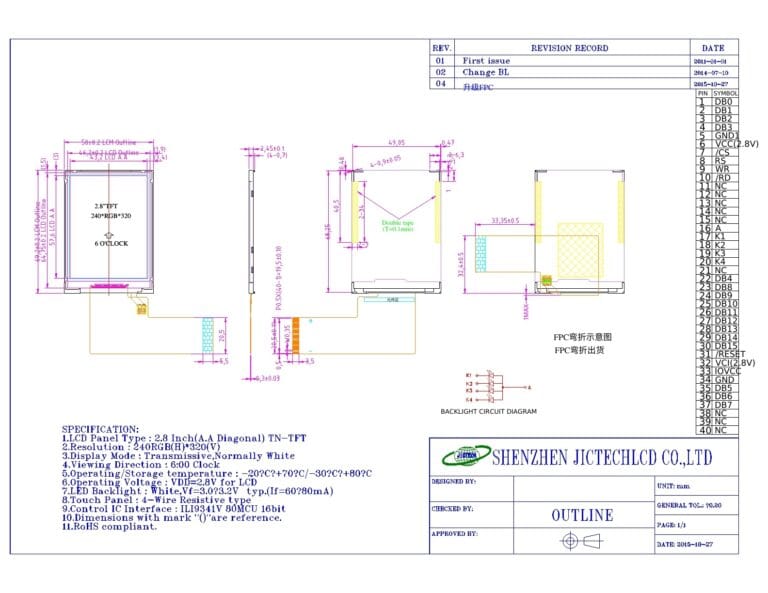
If the enclosure is fixed or the product needs a specific aspect ratio, a custom TFT LCD display may be the better route. Custom work usually covers the FPC, cover glass, touch, brightness and mechanical outline; the panel itself may still be a standard cell cut or a modified standard module. Expect tooling/NRE, a higher MOQ and a longer sample lead time than a catalogue module.
For most first prototypes, it is faster to design around a standard 3.5″, 4.3″, 5″, 7″ or 10.1″ module, then customize the cover glass and touch. That keeps the panel supply stable while still fitting your enclosure. See our TFT LCD modules and custom TFT LCD displays for the available options.
Size selection checklist
| Check | Why it matters |
|---|---|
| Viewing distance and PPI | Sharpness and readability |
| Enclosure and bezel | Mechanical fit |
| Resolution and UI density | Text, charts, touch targets |
| Brightness and surface | Indoor vs outdoor readability |
| Interface and cable length | SoC compatibility and EMI |
| Touch and cover glass | Interaction and durability |
| Lifecycle and MOQ | Supply and cost |
FAQ
What is the most common TFT display size?
For industrial products, 3.5″, 4.3″, 5″, 7″ and 10.1″ are the most common. For consumer laptops, 13.3″, 14″ and 15.6″ dominate.
Can I get a TFT display in a custom size?
Yes, but it usually involves custom tooling, a higher MOQ and a longer lead time. Many projects use a standard panel and customize the cover glass, FPC and touch instead.
Does a larger TFT display use more power?
Usually yes, because the backlight area is larger. The panel type, brightness setting and content also matter; a bright 10.1″ panel can draw more than a dim 7″ panel.
What resolution should I choose for a 7-inch TFT?
800×480 is common for simple HMI; 1024×600 is better for denser UI and charts. Match the resolution to the viewing distance and the amount of text.
About the author: Bill Hu is the founder of JicTech and has worked in display module engineering and manufacturing since 2003. Read his profile. Last updated: October 2026.